
FALL
50% OFF SALE
USE PROMO CODE: 50OFF FOR DISCOUNT
SALE ENDS: 10/31/26
Day(s)
:
Hour(s)
:
Minute(s)
:
Second(s)
Signup Now ➤
All Your
Favourite Channels.
One Low Price
Cut cable & streaming costs by up to $4,000 a year
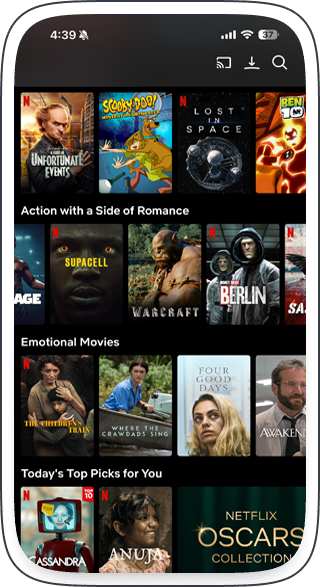
Live sports, premium channels, movies & shows. No contracts
Live Channels
News, family, comedy, lifestyle — all in one place.
Movies
Blockbusters, classics, and new releases updated weekly.
Television Series
Binge your favorites or discover something new.
Live PPV Channels
Catch every fight night, concert, and major event — no extra cost.
Live Sports Channels
Every game, every league — NFL, NBA, UFC, and more.
Trusted by streamers nationwide.
Bringing every major network, movie, and sport together in one simple platform.









































Why Spend Hundreds More for the Same Channels You Already Love?
Get live sports, premium channels, movies, and shows all for just $30/Month?
No contracts. No cable. Just smarter streaming with StreamCheap.tv.
Supported On
Android
Smart tv’s
Fire/Roku Sticks
IOS/Apple
PC/MAC
Tablets (all brands)
Works on nearly every device. Tap your platform above and start streaming in just a few steps.
Pricing
One device = one stream at a time.
You can install it on any device — TV, phone, tablet, or computer — but you can only watch on one device at a time.
Want to watch in another room or on another screen “AT THE SAME TIME”?
Add another device and save!
1 Month Plans
Add more devices, save even more.
3 Month Plans
Save 15%
Add more devices, save even more.
6 Month Plans
Save 30%
Add more devices, save even more.
Stream anywhere.
Cancel anytime.
No hidden fees.
Choose your device above to access the step-by-step setup and download instructions.
Andrioid Devices ►
Smart tv’s ►
Amazon Fire Stick ►
IOS/Apple Devices ►
PC/MAC Computers ►
Roku TV ►
Works on nearly every device. Tap your platform above and start streaming instantly.
Earn a FREE 1-Year Subscription, Vacation, or Cruise!
Stream. Share. Earn incredible rewards starting with your first 3 referrals.
Become A StreamCheap.TV Ambassador
► Refer 3 → Get a FREE 1-Year Subscription (Value: $360)
► Refer 10 → Get a FREE 3-Day / 2-Night Vacation Getaway (Value: $350)
► Refer 25 → Get a FREE 8-Day / 7-Night Vacation Getaway (Value: $2,000)
or a 7-Night Cruise for Two (Value: $1,500)


Download
Android App & Instructions
1. Click on the button above and download android app on your phone.
2. Any warnings, please disregard
3. Open app
4. Allow download from unknown sources
5. Click install
6. Choose Mobile or TV
7. Accept agreement
8. Select Xstreatm Code option
9. Enter any name you wish to name your playlist
10. Enter the username and password provided
11. Enter the URL provided
12. Choose add user
13. Allow app to download the live tv, movies, and television series
Download
IOS/Aapple App & Instructions
1. Click on the Button Above to Download the app called Smarters Player Lite
2.. Once you installed and open the app you will select Xstreatm Code option
3.. Enter any name you wish to name your playlist
4. Enter the username and password provided
5. Enter the URL provided
6. Choose add to playlist
7. Allow app to download the live tv, movies, and television series
Short Setup Video
Download
Smart TV App & Instructions
Step 1: Access the Samsung App Store
Turn on your Samsung Smart TV and ensure it is connected to the internet.
Press the Home button on your TV remote to access the main menu.
Navigate to and open the Apps section.
Step 2: Search for Smarters Player Lite
Use the search bar and type Smarters Player Lite.
Select the app from the search results.
Step 3: Download and Install
Click the Download button to begin the installation process.
Wait for the app to install. Once completed, it will appear in your apps list.
Step 4: Launch and Configure the App
Open Smarters Player Lite from the apps list.
Agree to the terms and conditions if prompted.
Enter your IPTV service details we provided (playlist link, username, and password) to start streaming content. Note: Enter any name you wish to name your playlist
Download
Amazon Fire App & Instructions
1. We will download IPTV Smarters Lite APK using the Downloader app.
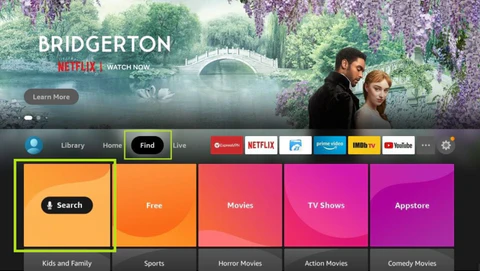
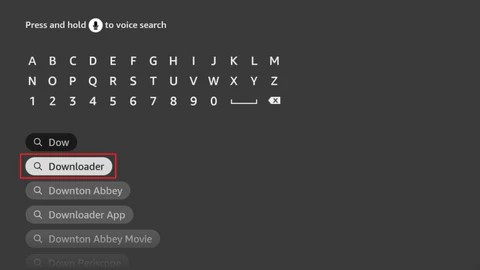
2-Type the name of the app (which is Downloader)
Click the Downloader option when it is displayed in the search results
Choose the Downloader icon on the following screen and download and install the app Smarter Player Lite.
3-Get back to the home screen of FireStick after installing the Downloader app
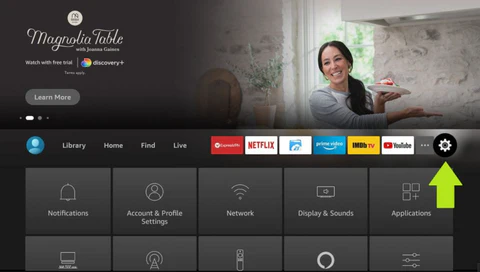
4-Go to Settings,and choose the option MyFireTV.
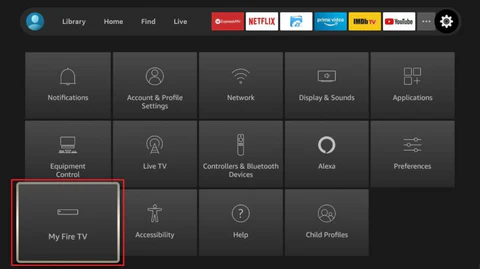
5-for next click Developer Options.
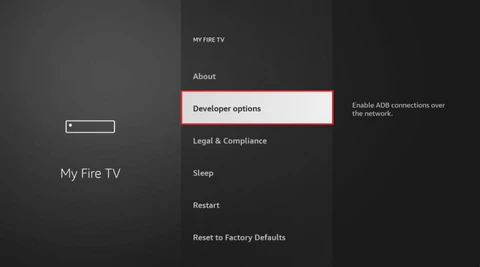
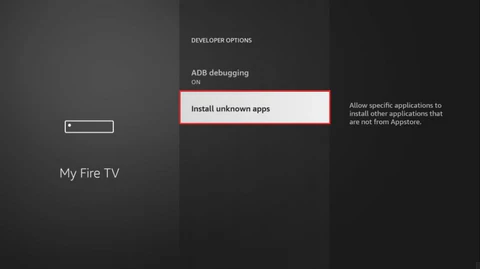
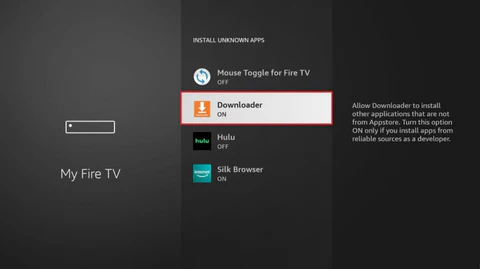
6-next step Install from unknown apps.
7-now You may open the Downloader ap.
8-enter the code 47827 in Enter the URL & Search term.
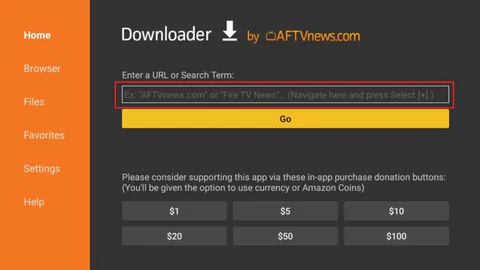
9-CLICK GO
10-DONE! You now have the IPTV Smarters Lite on FireStick.
11- Now go back to home screen of your Fire Stick and Choose the app IPTV Smarters Palyer Lite and open the app.
12- Once app is open name the Playlisten you wish to name.
13- In Username, Password & URL enter the details that we have provided you.
14- After entering details we provided click on the Add playlist and wait few seconds for the app to load All Live channels, Movie & series.
14- Once loading is done you are good to watch your favourite Movies, Live channels & TV Series.
Download
PC/MAC App & Instructions
1. Click on the Button Above to Download the app called Smarters Player Lite
2.. Once you installed and open the app you will select Xstreatm Code option
3.. Enter any name you wish to name your playlist
4. Enter the username and password provided
5. Enter the URL provided
6. Choose add to playlist
7. Allow app to download the live tv, movies, and television series